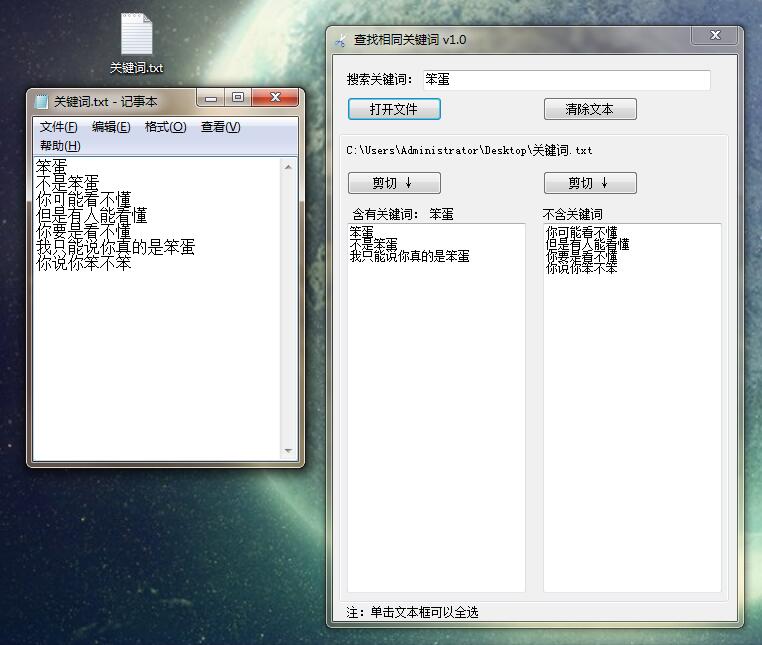
这个是用来筛选关键词的,因为工作关系,以前有段时间总是要筛选关键词,虽然excel是可以筛选的,但是不够傻瓜,因为我希望我的徒弟,甚至是每个人都可以不用学习,只需要输入同类型的词语就可以筛选,所以就写了这个软件来筛选关键词。
总共写了7个版本,但是后几个版本不知道为啥,总是出现乱码,我估计是取词在内存的时候与字符有关,但是那时候又没啥时间改了,就留下来了,这是第三个版本。功能基本上都有,可以使用。
功能截图:
C#代码如下:
using System;
using System.Collections.Generic;
using System.ComponentModel;
using System.Data;
using System.Drawing;
using System.Text;
using System.Windows.Forms;
using System.IO;

namespace opentxt_3
{
    public partial class Form1 : Form
    {
        public Form1()
        {
            InitializeComponent();
        }

        int count = 0;


        List<String> Listall=new List<string>();

        private void button1_Click(object sender, EventArgs e)
        {
            if (this.textBox1.Text == "")
            {
                MessageBox.Show("先输入关键词!");
            }
            else
            {
                this.textBox2.Multiline = true;
                string str = this.textBox1.Text;
                this.label5.Text = this.textBox1.Text;

                Listall.Clear();

                //声明打开文件
                OpenFileDialog f = new OpenFileDialog();
                //确定打开类型
                f.Filter = "文本文件(*.txt)|*.txt";
                //打开目录
                f.InitialDirectory = Application.StartupPath + "\\Temp\\";
                //设定文件只读
                //f.ShowReadOnly = true;
                //返回值
                DialogResult r = f.ShowDialog();

                //获取到详细的文件目录
                this.label1.Text = f.FileName;

                if (r == DialogResult.OK)
                {

                    //读取文件目录并打开文件
                    FileStream Newfile = new FileStream(this.label1.Text, FileMode.Open);
                    //读取文件/编码
                    StreamReader Newtxt = new StreamReader(Newfile, Encoding.GetEncoding("GB2312"));

                    string line = Newtxt.ReadLine();

                    for (int i = 0; line != null; i++)
                    {

                        if (line.Contains(str) == true)
                        {
                            count++;
                            this.textBox2.Text += line + "\r\n";
                        }
                        else
                        {
                            Listall.Add(line);
                        }

                        line = Newtxt.ReadLine();
                    }

                    foreach (String item in Listall)
                    {
                        this.textBox3.Text += item + "\r\n";
                    }
                    Newfile.Close();
                    Newtxt.Close();

                }

                if (this.textBox2.Text == "")
                {
                    MessageBox.Show("你确定你的里面含有关键词:" + this.textBox1.Text);
                }

            }
        }

        private void button2_Click(object sender, EventArgs e)
        {

            this.textBox1.Text = "";
            this.textBox2.Text = "";
            this.textBox3.Text = "";
        }

        private void textBox_Click(object sender, EventArgs e)
        {

            this.textBox2.SelectAll();
            this.textBox3.SelectAll();
        }

        private void button3_Click(object sender, EventArgs e)
        {
            this.textBox2.SelectAll();
            this.textBox2.Cut();
        }

        private void button4_Click(object sender, EventArgs e)
        {
            this.textBox3.SelectAll();
            this.textBox3.Cut();
        }
    }
}
照例,百度云盘链接: https://pan.baidu.com/s/1ghfYtg5G8hCOA_1EMhACrA 密码: x99u
转载请注明:三五二萌文网 » 关键词筛选小工具(C#版)百度云盘链接